Sunday, March 27, 2016


Monday, December 23, 2013
Monday, March 19, 2012
Double G Post Production
Tony Bannan - Manager and Flame Artist of Double G Post Production has taken up a creative position at Ammo.Digital a Digital Asset Supplier in Perth Western Australia. For more information contact Tony
Sunday, December 18, 2011
Animeeple is closing up shop
Sad new to hear that Animeeple are closing up shop on Jan 31st. If you'd like a great fbx, bvh editor that can output .fbx then you better be quick.
A great companion to Quidam.
Wednesday, September 21, 2011
Friday, February 25, 2011
ANTICS 3D - REPLACEMENT SOFTWARE
A program that allows realtime animation of 3d characters and scenes. Allows you to easily pose and animate, as a number of preset animations to allow a character to interact with props. Allows you to import from google sketchup. Provides for animation of camera and switching of many cameras in a scene. Allows import of motion capture files (.bvh).
Provides realtime lighting with shadows. Has a timeline and graph editor for manipulating events. Sound too good to be true?
How about a program that animates the characters lips when you load a sound file? Or even has some preset emotions available for your characters.
Well my friends, that program was Antics 3D.
It was available about 4 years ago and had a following of around 20,000 users.
It has been discontinued.
If you are a developer out there and your are looking for a market that needs a solution.
We'd love to support your efforts.
Ammo Previz.
If you'd like to know more about what this product is capable of ...
www.previz.com.au
or ammoant on youtube.
If you'd like to see how the community has been moving forward, or to check out how to get hold of old versions etc
goto to the forum
http://previz.yourbb.eu/
password is "antics"
Thursday, December 23, 2010
State of Previz Today
Merry Christmas all.
I've come across a number of previz applications available today.
If you happen upon some others please email me.
Saturday, May 29, 2010
Previz in 3d stereo Latest Previz software


I guess we've all seen Avatar in 3d stereo by now and it does raise a good question.
What solutions are out there for creating your own Machinima style Avatar film?
Well the folks at iClone

I think iClone is probably the best choice. It seems to have evolved in leaps and bounds to not only provide fantastic environments but now it offers 3D stereo as well!
TVnima is a new player entering the machinima toolkit. Now in Beta, it's worth keeping an eye on.
3d doesn't have to be a headache. If you have a set of Red/Green glasses and you want to see some very cool print ads click on the pills.
Lastly, thanks to the organisers of the FILE exhibition this year. It was fun to be a part of this international event.

Wednesday, March 10, 2010
Moving Antics onto a new PC?
"Very interested to hear if anyone has success with this solution."
Laplink
Laplink

PCmover can migrate your PC across a network, Laplink USB cable, Windows Easy Transfer Cable or any type of removable media that can be read by both PCs. If your computer has multiple users, PCmover gives you the option to migrate some or all of the users at once. The security information about file ownership and access control is preserved for each user. You can even use PCmover to migrate your PC to an Intel-based Mac
Wednesday, January 27, 2010
Tony Bannan - Manager Double G Post Productions
Hi guys, been a little busy of recent times. I've been flat out moving cities, jobs and relocating the family back to Perth, Western Australia. I've taken up a position as Manager of Double G Post Productions. I'll still be doing my Flame work and of course my Previz work, wherever I can.
I had a great time away in Adelaide where I was fortunate to work on 5 feature films and a 26ep kids sci-fi series. Now I'm back, I'm really looking forward to sharing my experiences with the Double G team of excellent artists.
Thursday, October 15, 2009
AMMO Previz - cg EXTRAS

Ammo Previz was engaged recently to aid in the creation of a new spot for a television campaign promoting a v8 supercar racing event. The brief called for a single shot, lasting 25seconds, of a fellow walking toward camera whilst a massive grandstand is constructed behind him. Antics was used to create nearly one hundred workers which populated the scene during the construction phase. These workers were created in various animated positions, with lighting to match the final scene. Ammo Previz also used Antics for previz stages to provide composition and shoot planning. The final previz was used on location to determine framing and timing for the key talent. Post Production was completed at Oasis Post.
Check it out and let me know what you think.
Thursday, October 1, 2009

Thursday, August 6, 2009
free bvh files - 1000's
 Hi guys, things are looking up on all fronts. Here's a batch of bvh files you may like to bookmark.
Here is a list of the actions.
I big shout out to the quidam guys. Must say I'm enjoying the way these guys have designed to posing feature within quidam. Just posed up a guy to dirve a forklift. Brought the forklift in as a prop, scaled it to suit the guy and then set a transperency value of 50% to the scene. This way I could see exactly where to position him. Too easy!
 Looking forward to the day I can animate within quidam.!!
Oh If your'e a lightwave user, check out JimmyRig. It's a bit like a junior Motion Builder, great for building/combing bvh motions.
Also if you're looking fix a machinima fix, I strongly recommend mellowhardy on the Moviestorm channel. Judging by the results he's getting out of Moviestorm, it may just be time to take another look at this app. I hope they can get over the flicky textures and robotic (linear) movements of the characters soon. That would be a fine day.
T.
Saturday, July 18, 2009
Machinima in Brazil - FILE 2009


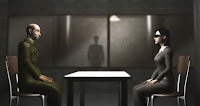
 This year sees two ANTICS entries in FILE 10 NURBS PROTO 4KT, the title of the FILE 09 exhibition, that will be held in São Paulo, Brazil, from July 28 to August 30, 2009.
Congrats to Pineapple Pictures: Kate Fosk and Michael R. Joyce
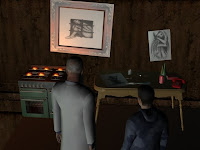
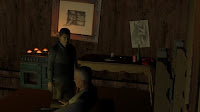
for the machinima clip - Revenge
A short machinima work made using Antics software. A wife discovers her husband is using their caravan as a place to take other women. In a fit of jealous rage she sets fire to the van.
for the machinima clip - Revenge
A short machinima work made using Antics software. A wife discovers her husband is using their caravan as a place to take other women. In a fit of jealous rage she sets fire to the van.


For my part, I was fortunate to have been invited for "Dark Previz"
If you get chance to check it out, I really had some fun with the lighting, in fact the project for me was really a test to see if some emotion could be presented from the 3d characters with set expressions. Also have a look at the artwork on the table and wall, some of my attempts at  drawing.
 drawing.
 I started this project using V2 of Antics3d. It was completed with V2.79. V3 of Antics fixed the wierd facial action that occurred when a character spoke. So if you're wondering if V3.1 of Antics is worth trying out, I'd say a big yes.
Wednesday, July 15, 2009
Quidam followup


Lately I've been pushed for time on all fronts, I did managed to get some more time on Quidam recently when a client in London was in a bit of a fix. Tony, can you create a poster for an event, I kinda need it tommorrow! Quidam turned out to be the perfect tool for creating a Dancer element. I find the program very good for customising and then posing a character. The ability to add props and paint textures is quite well implemented. For my renders I chose the cell shader look which was quite nice. The poster turned out quite well, although it wasn't used it the end!
On the Antics side of things, I'm currently in R&D on a concept requiring an animated crowd presented in a timelapse style. The tests are looking really cool and the pipeline will probably include Antics and Quidam to build elements for Maya. The job is for later in the year so I'll post some images once it's gone to air. Antics is being used for previz on this job also.
For my day job I've been fortunate to have worked on around 20 shots for a feature that's just about to be released. For our part the project was completed at 4k which was something new and way cool.
Tuesday, June 9, 2009
Wednesday, June 3, 2009
Free Bvh Motions - Mr Bones New site!
Truebones is proud to present a brand new website! Key features of the new Truebones website: A HUGE Variety of high quality Motions in BVH format Free Motions in BVH and FREE animation software. Informative monthly newsletter Animation Video channel gallery. Fast motion search and ordering system. Online Store with instant downloads of products. Full discussion and customer support forum. Full previewing of for sale motions, Try before you buy! (via FREE Animeeple Software) Please feel free to Join Truebones today by registering at our brand new website. http://www.truebones.com Join today and you will receive over 50 Free BVH Motions, In addition you will get a 50% discount for the New MonsterBones MegaMotions 2400 Pak just by signing up.
Friday, May 29, 2009
quidam3 25% discount offer

The Q3 demo version has just been released, check it out.
Also have a try of Animeeple for character animation!
It is new, it is very intuitive and it lets you:» Apply animations onto characters» Layer and sequence the animations» Edit animations using procedural modifiers» Render images and movies» Animate your Second Life™ avatar» Export content as FBX, Collada, BVH and XMLExporting from QUIDAM to Animeeple requires the COLLADA export plugin (included in QUIDAM Studio, this plugin can be purchased separately by QUIDAM users).

If you are interested in markless motion capture, drop by my other blog, PREVIZPOST I think it's pretty exciting technology.
Friday, May 22, 2009
FrameForge Previz Studio 3

The wait is nearly over! While the new version will be released to the public shortly, you can be among the first to preview the powerful features soon to be available in FrameForge Previz Studio 3, the software that's redefining storyboarding and previsualization.
At upcoming events in Seattle and Paris, Ken Schafer, Lead Program Architect at Innoventive Software, will present an exclusive look at the latest edition of this ground-breaking program. He'll demonstrate how every filmmaker can benefit from translating a script to an optically accurate previsualization, complete with a three-dimensional scale location stocked with actors, props, wardrobe, set dressing, basic lighting and backgrounds. Check out this page for a rundown of new features.
At upcoming events in Seattle and Paris, Ken Schafer, Lead Program Architect at Innoventive Software, will present an exclusive look at the latest edition of this ground-breaking program. He'll demonstrate how every filmmaker can benefit from translating a script to an optically accurate previsualization, complete with a three-dimensional scale location stocked with actors, props, wardrobe, set dressing, basic lighting and backgrounds. Check out this page for a rundown of new features.
Wednesday, May 20, 2009
History of 3d Animated Films
Thanks to ArianeB for this History of 3d Animated Films.
Have a read through, I'd like to hear which ones are your favorites and why?

t.
Subscribe to:
Posts (Atom)